
Shopware
How we monitor Shopware product feeds with Zabbix

Recently, the Google Shopping feed of one of our clients shrank overnight. It didn't disappear and it didn't return an error. It was simply a lot smaller than it should have been.
We found out a day later, and not from our own monitoring. Google Merchant Center told us. Products were about to drop out of Shopping ads.
This time we got lucky. Google gives you a grace period of about three days before disapproved products really hurt, so the feed was fixed before it cost the shop anything. We don't want to depend on luck, though. A shop that lives on Shopping traffic should not hear from Google that its feed is broken, let alone a day late.
So besides fixing the feed, we changed how we watch it. This post walks through how we now monitor product feeds with Zabbix, step by step, including the settings and the gotchas we ran into. If you run Zabbix yourself, you can copy it as is.
Why a shrinking feed slips through
The shop already had monitoring: CPU, memory, disk, swap, uptime. All of it stayed green, because nothing was down.
That's why feed problems are easy to miss. Shopware generates its product exports as files, served from a URL
like /store-api/product-export/<access key>/google.xml. When something goes wrong in that generation, you
often still get:
- An HTTP 200. The URL works, so an uptime check is happy.
- Valid XML. The file opens and parses, so Google accepts it at first.
- Just fewer products. Hundreds or thousands of items quietly missing.
We still don't know exactly why it happened. A half-finished export run, a timeout during generation, a product import that changed visibility for a while, a cache serving an incomplete file. All plausible, none proven. You can't write a check for every possible cause, but you can check the result: the file got much smaller than usual. A healthy feed for this shop sits around 19 to 20 MB.
The approach: download it like Google does
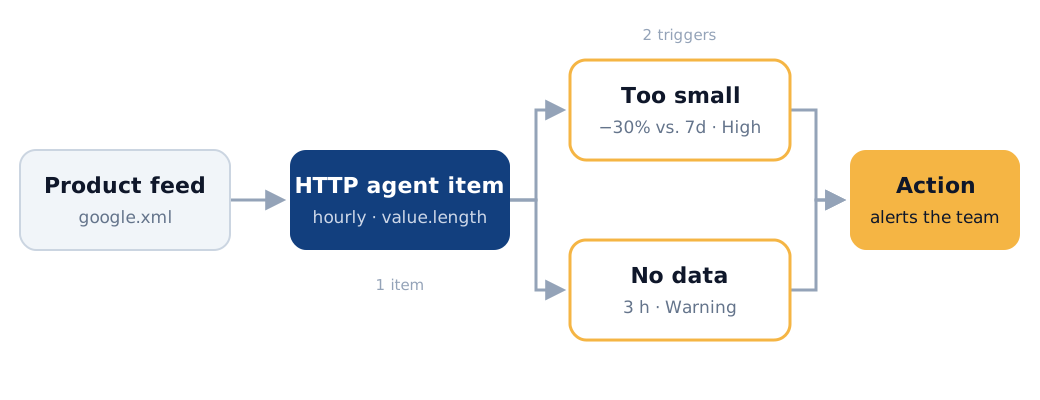
Every hour, Zabbix downloads the feed the same way Google Merchant Center does, measures how big it is, and stores that number. Two triggers watch it:
- Too small: the feed is more than 30% smaller than its average over the past week. Something is wrong with its contents.
- No data: Zabbix hasn't received a value for 3 hours. Something is wrong with the download itself.
The size check has no fixed threshold. It compares the feed to its own history, so it keeps working when the catalogue grows or shrinks, without anyone having to update it.
We use the Zabbix server we already run for all our client servers, so there was nothing new to install. Everything below is done in the Zabbix 6.4 frontend, no shell access or custom scripts needed. Newer versions work the same way, with slightly different menus.
Step 1: an HTTP agent item that measures the feed
Go to Data collection → Hosts, open the Items of the host that runs the shop, and click Create item. We attach the check to the shop's own host, so the feed sits next to the rest of that shop's monitoring.
On the Item tab:
| Field | Value | Why |
|---|---|---|
| Name | Google feed NL-BE file size | One item per feed, so name it after the feed |
| Type | HTTP agent | Zabbix server fetches the URL itself, no agent needed |
| Key | feed.size[google] |
Any unique key; the bracket part tells feeds apart |
| Type of information | Numeric (unsigned) | We store a byte count, not the file |
| URL | https://www.example.com/store-api/product-export/<access key>/google.xml |
The exact URL you gave Google |
| Request method | GET | |
| Timeout | 60s | Big feeds take time; 60s is the maximum in 6.4 |
| Required status codes | 200 | Anything else makes the item unsupported |
| Retrieve mode | Body | We need the actual file, not just the headers |
| Units | B | Zabbix then shows 19.87 MB instead of a raw number |
| Update interval | 1h | Often enough to catch it the same day, light on the shop |
Next, on the Preprocessing tab, add one step of type JavaScript:
return value.length;
Zabbix runs preprocessing on the server, right after the download: the full body goes in, a single number comes out. Only that number is stored, so your database doesn't fill up with 20 MB XML files every hour.
Two notes on this approach:
value.lengthcounts characters, not bytes. Accented characters in French product titles take two bytes but count as one. Because we only compare the feed to its own earlier values, that difference cancels out. If you need byte precision, use an external check withcurl -w '%{size_download}'instead.- Why not just read
Content-Length? You could set Retrieve mode to Headers and parse that header. It's lighter, but it relies on what the server says it sends. We want to know what actually arrives, so we download the whole thing.
Step 2: test it with Execute now
Zabbix has a Test button on the item form. It fetches the value and runs your preprocessing without saving anything. On our feed, it failed with this:
Size of the response received from Zabbix server exceeds the allowed size of 16777216 bytes.
The item itself is fine. The server downloaded the feed without problems. The limit comes from the test dialog: the frontend also wants to show you the raw value before preprocessing, and refuses anything over 16 MB coming back from the server. Normal data collection never sends the raw body to the frontend, so the limit doesn't apply there.
You can raise ZBX_SOCKET_BYTES_LIMIT in include/defines.inc.php, but we'd rather not patch the frontend for
a test dialog. This works just as well:
- Save the item.
- In the item list, tick its checkbox and click Execute now.
- Go to Monitoring → Latest data, filter on the host, and look for your item.
Within a few seconds we had our first real value: 19.87 MB. From here on, Zabbix stores a new value every hour, and those values become the baseline for the first trigger.
Step 3: two triggers, two failure modes
The item only collects numbers. To get an alert, you need triggers. Go to the host's Triggers and create two of them.
Trigger 1: the feed is much smaller than usual. Severity High.
last(/shop-host/feed.size[google])<0.7*avg(/shop-host/feed.size[google],7d:now-1h)
last() takes the most recent value. avg() is the baseline: the average size over seven days. The :now-1h
part is a time shift. It makes the window end an hour ago, so the value we're judging isn't part of the
average it's judged against.
Why 30% and why a week:
- 30% is far outside normal ups and downs (a sale ending, a category going offline), and still catches a feed that lost a large part of its products.
- A week is long enough that a broken feed doesn't drag its own baseline down right away. With an hourly check, a feed stuck at half its size stays a problem for days before the average catches up, instead of resolving by itself overnight. A week also evens out weekday patterns, like a catalogue that changes on Mondays.
Make sure the item keeps history for longer than seven days, or the baseline has nothing to work with. The default does. On a new item the average is based on only a few values, so give it a day before you trust it.
Two small additions make the alert more useful:
- Operational data:
Size: {ITEM.LASTVALUE1}, so the alert shows the actual size. - URL: the feed URL itself, so whoever picks it up can open the feed in one click.
Trigger 2: the check itself stopped working. Severity Warning.
nodata(/shop-host/feed.size[google],3h)=1
This one is easy to forget. If the download times out, returns a 500, or the shop is down, the item goes
unsupported and no new value arrives. Trigger 1 keeps evaluating the last good value and won't fire.
nodata() covers that case: no value for three hours means three missed checks in a row.
We tag both triggers with component: feed, so they're easy to filter in the Problems view and in actions.
Step 4: make sure the alert reaches someone
A trigger only helps if someone gets the alert. In Alerts → Actions → Trigger actions, check that an action
covers the new triggers. A catch-all action that notifies your admin group on every problem will do. If you
route alerts per client or per severity, add a condition on the component: feed tag or the host.
Then check the media of the users who should receive it. If their email or Slack media is set to only use severity Disaster, a High problem won't reach them.
More feeds, same check
Most shops have more than one feed: one per sales channel, one per language, sometimes one per marketplace. Our client has three. Once the first item works, the rest is quick:
- Open the item and click Clone.
- Change the name, the key (
feed.size[google_fr],feed.size[google_frbe], …) and the URL. - Save, then create the two triggers for the new key.
Preprocessing, interval and timeout come along with the clone, so the URL is the only thing left to get wrong. Because the threshold is relative, there's also no number to pick per feed: a 2 MB marketplace feed and a 20 MB Google feed use the exact same trigger. Click Execute now once per feed to confirm each one returns a sensible value.
Variations and limits
This setup is built to catch a feed that suddenly loses a big part of its content. A few things it doesn't do:
- It catches sudden drops, not slow decline. The baseline follows the feed. A feed that loses 1% a day for a month never looks 30% smaller than last week, so the trigger never fires. In our experience, feeds that break do so suddenly, so we accept that trade-off in exchange for a threshold we never have to update.
- Planned changes fire too. Shut down a sales channel or remove half the catalogue, and the trigger can't tell that apart from a broken export. Enable Allow manual close on the trigger, so you can close the problem once you've confirmed the drop is intended. The baseline catches up within the week.
- Size is a proxy for products. If you'd rather count items, change the preprocessing to count
<item>elements and alert on that. It's more precise, but a bit heavier on the Zabbix server for large feeds. - It doesn't validate content. Wrong prices or broken image URLs don't change the size. For that, check the diagnostics in Merchant Center.
- The 60 second timeout is a hard limit in Zabbix 6.4. If a feed takes longer to serve, the
nodata()trigger will tell you, and the fix is usually in how the feed is generated and cached, not in Zabbix.
Part of our standard setup
We didn't build this for one shop. These checks are now part of our standard monitoring stack for every Shopware project we host or maintain. Every product feed a client sends to Google Shopping or another sales channel gets:
- an hourly download and size check,
- a "too small" trigger that compares the feed to its own past week,
- a "no data" trigger for when the download itself fails,
- alerts that go to our team.
If a feed shrinks overnight again, we want to know within the hour and have it fixed before Google notices.
If your product feed broke tonight, would you find out before Google does? If you're not sure, we're happy to take a look at your setup. Monitoring is part of every project we take on, and we'll gladly add your feeds to it.
Let's talk
Have an e-commerce project in mind?
We're a boutique e-commerce agency. Tell us what you're building and we'll help you move faster.